

On May 30, 2020, we experienced a rare situation in the public-key infrastructure of the Internet when two of the root certificates expired, one signed by the other SSL certification authority.
Theoretically, this is nothing unusual. Certificates expire constantly (usually in a year or even in 90 days when you use Let’s Encrypt), and the certificates of the certification authorities expire after a few years. But on May 30, the expiring certification authority uncovered a fundamental problem that resulted in our API being unavailable for some of our customers.
On May 30, when the certificates from the certification authorities expired, we received support requests that there was a certificate issue with our service. This was an unexpected notification, as we carefully check whether our certificates are valid and do not expire within the foreseeable future. A quick check in the browser also confirmed that everything seemed to be normal and that the API was responding correctly.
When looking at the statistics of our infrastructure, we noticed that the number of API calls had decreased, but it was by far not close to zero, as would have been expected in the event of a complete SSL failure. When things are not working completely, it is often easier to see what is not working than in situations where some things work and others do not.
An extensive investigation eventually revealed that problems had also occurred with other services on the Internet. We quickly found clues as to the cause: https://support.sectigo.com/articles/Knowledge/Sectigo-AddTrust-External-CA-Root-Expiring-May-30-2020
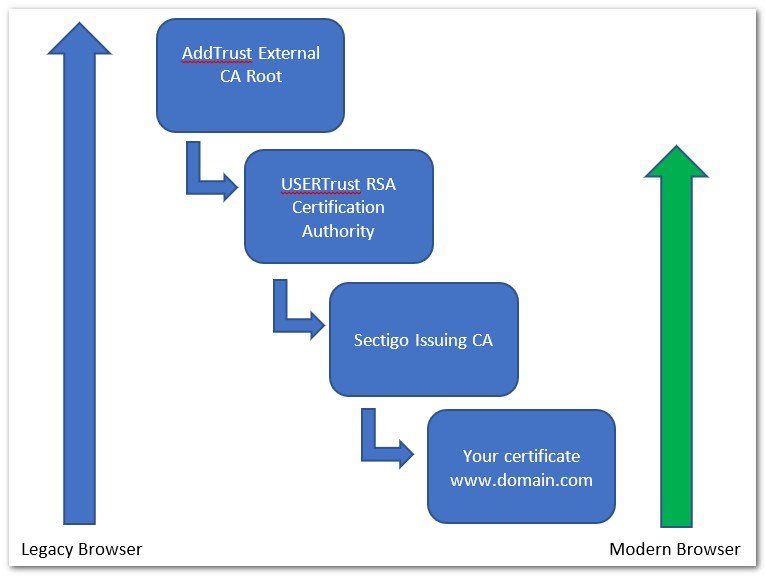
- The certificate of our intermediate certification authority Sectigo RSA Organization Validation Secure Server CA was valid.
- In path 1, the root certificate USERTrust RSA Certification Authority was valid, and the entire chain was valid.
- In path 2, the certificate of our root certification authority, the USERTrust RSA Certification Authority, expired on May 30 at 10:48 UTC.
- The certificate of the Root Certification Authority AddTrust External CA Root, which the certificate from USERTrust RSA was cross-signed, expired on May 30 at 10:48 UTC.
This was an interesting situation. There was a valid path to the USERTrust RSA Certification Authority, and there was also an expired path. The browser was able to find the valid chain, but the lock was unable to find it. The test by Quality SSL Labs showed that the system worked and the certificate configuration worked flawlessly.
Our team began with the second change to our public certificate and tried to restore the service to the remaining customers, and shortly after deployment they confirmed to them that they could regain access to the service. The incident was now finally over, and the service was restored for all customers. But why did some of our customers lose access in the first place, when even the SSL scanner says that the certificate is valid?
The certificate was indeed valid, and the entire certificate chain was generated fairly correctly by the certification authority Comodo/Sectigo (running a certificate over the weekend is not a good practice). What was not provided for was the way the client libraries would handle this situation, primarily OpenSSL, which powers the vast majority of HTTPS on Earth. In analyzing the incident, we came across an interesting OpenSSL bug from 2014 that states:
Do not use expired certificates if possible.
Source: https://github.com/openssl/openssl/commit/0930251df814f3993bf2c598761e0c7c6d0d62a2
When looking for the issuer of a certificate, if the current candidate is expired, continue searching. Return an expired certificate only if no valid certificates are found.
This means that before implementing this change, OpenSSL always declares the certificate invalid when it detects an invalid certificate in the chain. After this change was implemented, OpenSSL skips the expired certificate and instead continues to search for additional certificates that can prove that the certificate is valid. This tiny change adapts to the nature of the certificate chain – a single certification authority can be signed by multiple certification authorities, some of which are still valid and others are no longer valid. All looks great, so why the impact?
If we continue digging, this change in OpenSSL is only part of OpenSSL 1.1.1 and not part of OpenSSL 1.0.x. This means, for example, that all versions of Ubuntu 16.04 and older, Debian 9 and older, CentOS 7 and older, or RedHat 7 and older are affected, but all of these are still generally supported versions, at least from a security standpoint.
But why did the browsers verify the certificates correctly? The browsers are delivered with their own SSL/TLS libraries and their own methods for verifying the PKI. Chrome is delivered with BoringSSL and Firefox with NSS, regardless of the SSL/TLS libraries of the underlying operating system; it does not have the same flaw and is updated much more frequently.
And now we finally have a complete picture of what happened and why only some customers' backend implementations were affected, and why some systems had outdated certificate stores that required a much older root certificate.
What happens next? We reach out to affected customers and explain what happened. We are improving our certificate review tool to verify the process across the entire chain, and not just our certificate.
FAQ
Was the unavailability of the service caused by a problem on the LOX24 servers?
No, the service continued to work and was only unavailable for outdated systems.
What should I do to avoid a similar situation happening in the future with LOX24 or other services?
Update your OpenSSL to at least version 1.1.1 and LibreSSL to at least 3.2.0. Also update your certificate store, which on Linux is often called the „ca-certificates“ package.
Has the certificate from LOX24 expired?
No, the certificate from LOX24 did not expire and is still valid. What expired was one of the 3 versions of the CA certificates from the certification authorities that signed our certificate.
Were any other providers affected, or was the problem specific to LOX24?
Unfortunately, there were also other providers that were affected: Heroku, Stripe, kernel.org, Datadog, Gandi.net, and many others.