



With the helpful filtering features of LOX24, you can easily protect your account and API access before sending unintended SMS messages. Massive and unwanted SMS messages can often be caused by „SMS Pumping Fraud“ or a malfunction of the applications themselves.
What exactly can the SMS filter do?
With the LOX24 SMS Filter you can control the sending of SMS messages via the API and also restrict it via all other channels. You can set the monitored period, the number of SMS messages, the allowed destinations, and the type of message (text or voice).
Possible limitations
In addition to the period and number of SMS messages, there are four ways to specifically restrict SMS delivery and thus protect against attacks or malfunctions:
Total number of messages:
You can limit the total number of SMS sent for a certain period of time, e.g. for an hour or a day. This filter is best suited for the case where an application is not working to prevent the sending of mass SMS.
States and networks are restricting
You can also restrict the sending of SMS to certain countries or allow it only to certain countries. In the event of an attack, SMS are often sent to very exotic targets that are particularly expensive.
Limit phone numbers
If you want to reduce the number of SMS messages sent to certain phone numbers or prevent other phone numbers from receiving SMS messages, you can save the phone numbers directly in the filter.
Filter voice messages:
If you don't want to send voice messages to the landline, for example, you can also block them. This is especially useful if you, for example, send links in SMS that are difficult to understand on the phone.

How to set up the SMS filters
Now comes the exciting part – the implementation. Follow these steps to activate the filter function:
- In your web account, you can find the configuration under Settings and Filters.
- Click on the „Create SMS Filter“ button there.“
- You then have the option to choose between the four filters.
Total filter
With this filter, you can limit the total number of SMS sent in a given period. This way, you can save on your SMS budget.
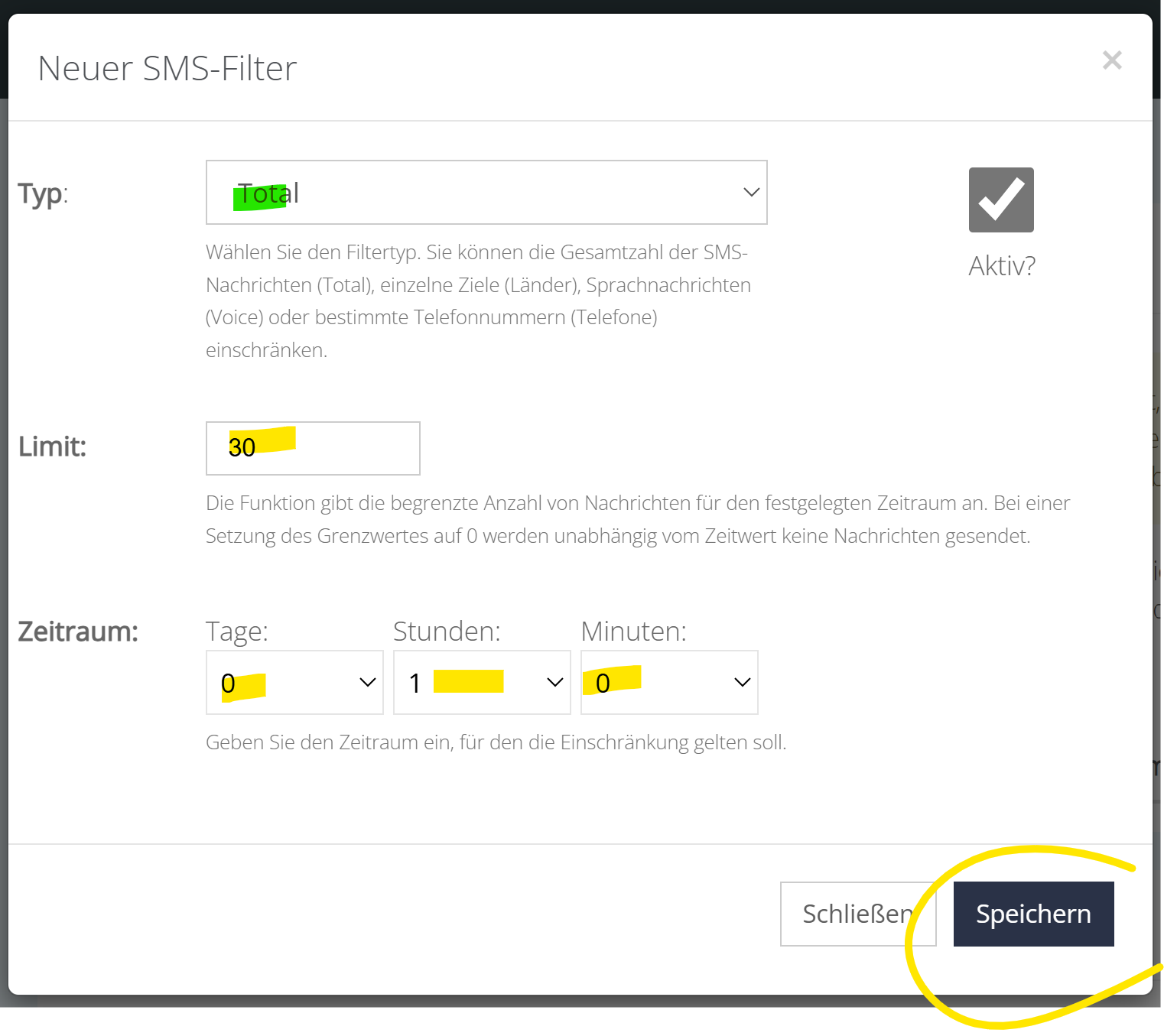
- As Limit Enter the total number of SMS messages you want to send maximum.
- As Period Enter the time to which the limitation applies. This can be several days, but it can also be only a few minutes.
- Afterwards, you only need to save the filter and it will be immediately active. There are no costs involved unless an SMS is filtered; otherwise, it is free of charge.
State filter
With this filter, you can restrict or block shipping to certain countries. This is especially useful for high-value targets that are targeted for attack.
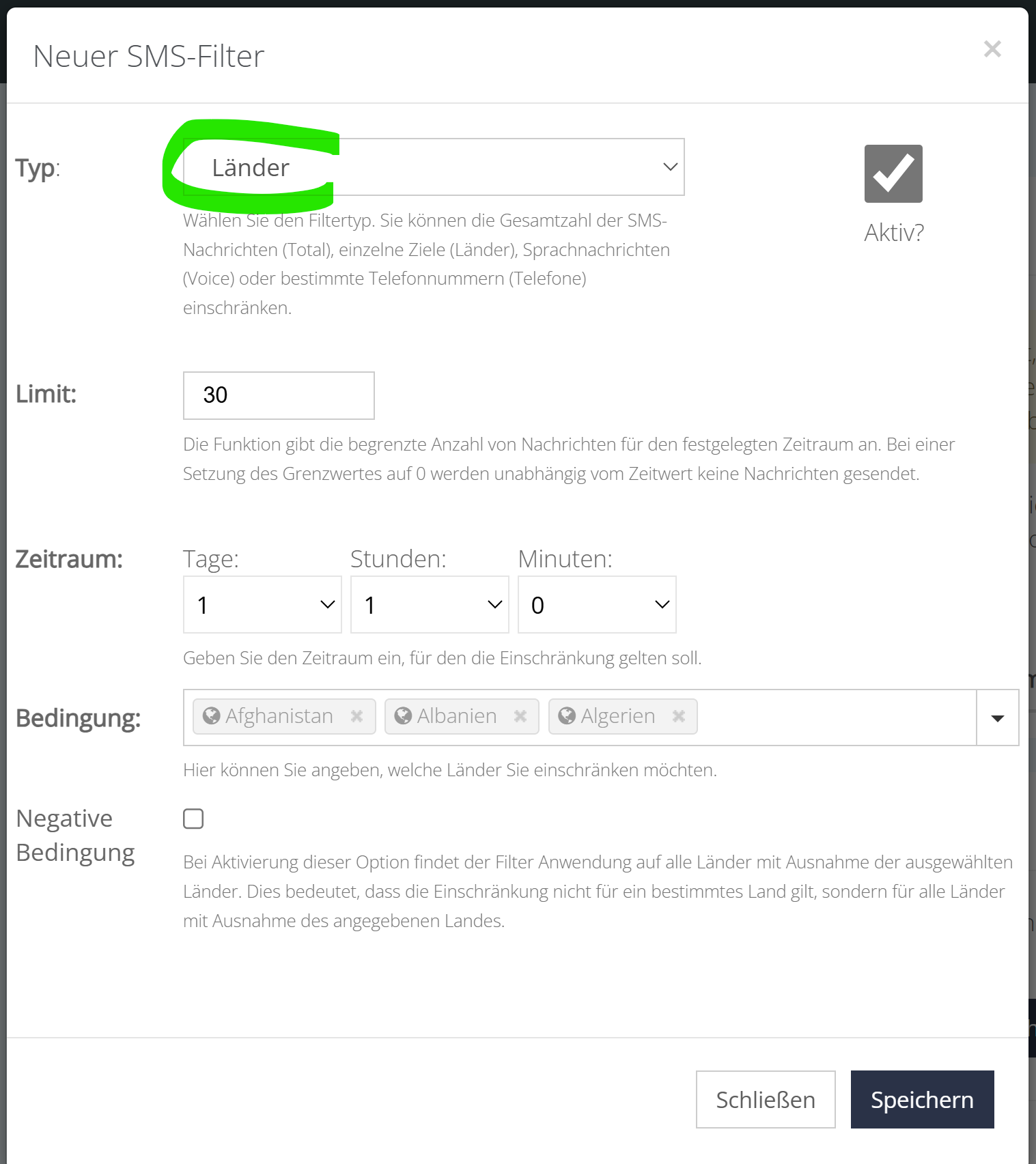
- As Limit Enter the total number of SMS messages you want to send maximum. If you don't want to send any SMS messages to any countries, simply enter zero.
- As Period Enter the time to which the limitation is to apply. This can be several days, but also just a few minutes. If the limit was zero, this does not matter.
- At the Conditions Either enter the countries into which you want to limit the SMS sending, or conversely, enter only the countries into which you want to send SMS and thus exclude all others.
- At the negative conditions Choose whether you entered the countries in the previous step that you want to filter (not clicked) or all other countries except those mentioned (clicked).
Voice filters
With this filter, you can restrict or block the sending of voice messages. This is useful, for example, if you do not want to send SMS to the landline. However, this filter only applies to voice messages that are sent via Economy, Pro, or Direct. If you explicitly send a Text2Speech SMS, it will not be filtered.
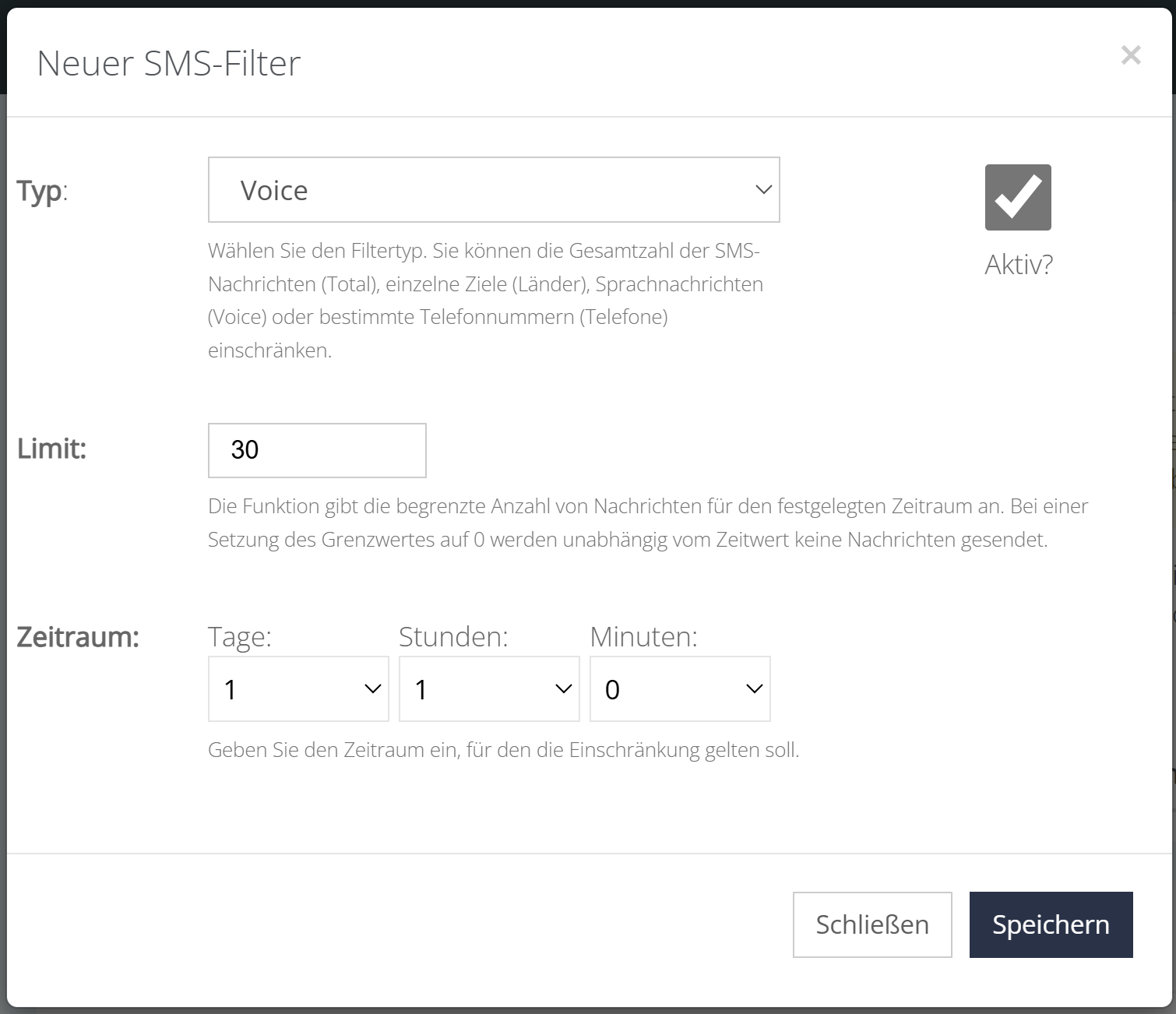
- As Limit Enter the total number of voice SMS messages that you want to send maximum. If you do not want to send any voice SMS messages at all, simply enter zero.
- As Period Enter the time to which the limitation is to apply. This can be several days, but also just a few minutes. If the limit was zero, this does not matter.
Phone filters
With this filter, you can restrict the delivery to specific phone numbers or restrict it to all phone numbers except the specified ones.
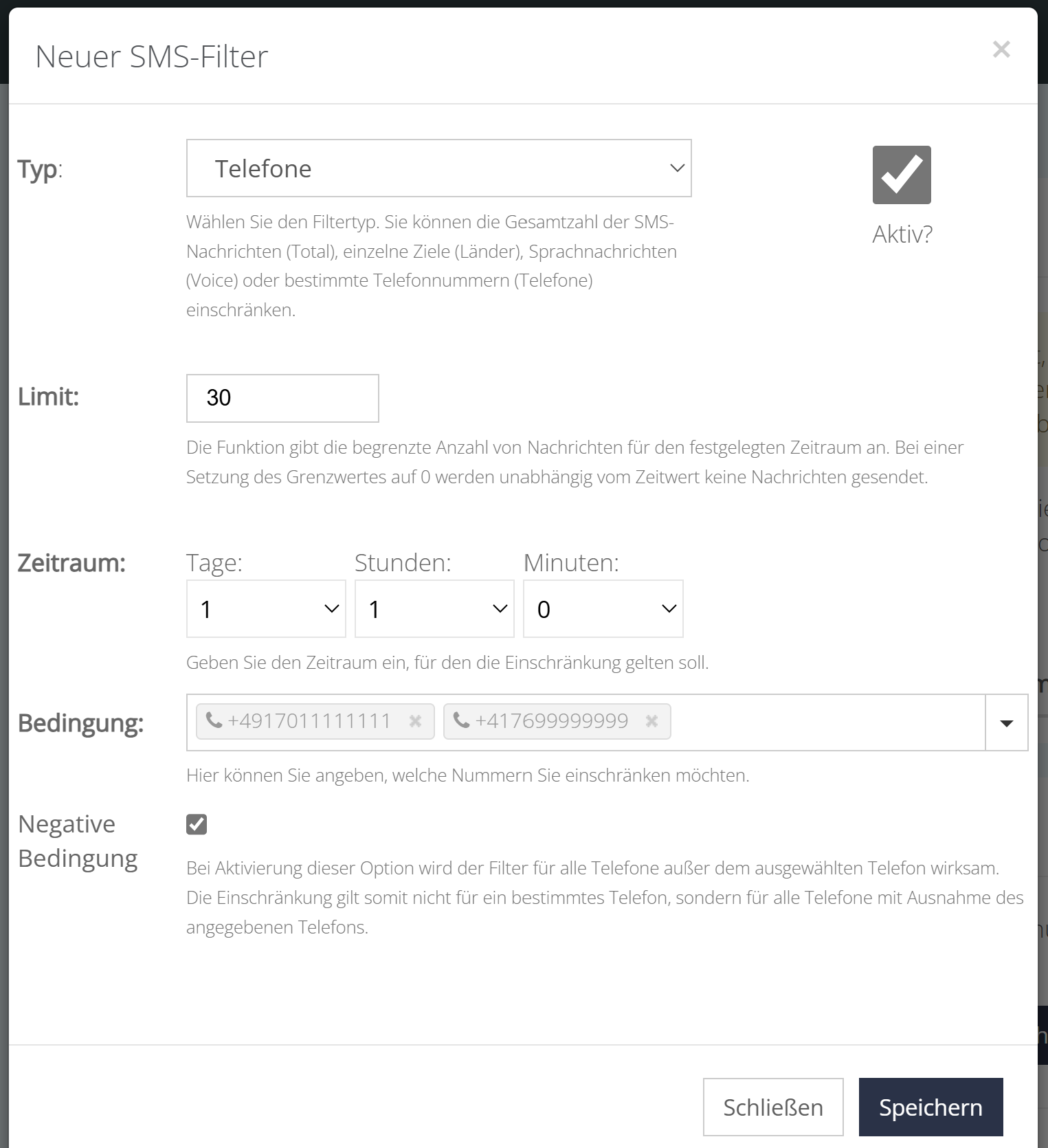
- As Limit Enter the total number of SMS messages that you want to send maximum. If you don't want to send any SMS messages at all, simply enter zero.
- As Period Enter the time to which the limitation is to apply. This can be several days, but also just a few minutes. If the limit was zero, this does not matter.
- In the condition, you either enter the phone numbers for which the restriction is to apply or select the phone numbers that are to be excluded from the filter (negative condition).
- The negative condition determines whether the filter should apply to all phone numbers not mentioned in the previous step (enabled), or only to the ones mentioned above (not enabled).
And why the LOX24 SMS filter?
The LOX24 SMS Filter is your insurance to keep your SMS costs under control in any situation.
SMS pumping fraud
This is a type of fraud where scammers request a large number of SMS messages from unprotected endpoints. They use automated bots to create fake requests for one-time passwords (OTP) or other SMS-based services. This results in high SMS costs for the companies.
Incorrect updates
A bug caused by a faulty update can affect the SMS delivery logic and result in a large number of unwanted SMS being sent to your customers. This can cause significant costs and upset your customers.
Excessive use
If you have a specific budget for SMS messaging only, our filters will prevent you from exceeding that budget. Only as many SMS messages as you maximum wish will be sent.