




When a user needs to authenticate, the RSA Authentication Manager sends a unique token code and a mobile phone number to LOX24, which sends the code via SMS to the user’s mobile phone. The user then enters the code in the agent’s input prompt and the authentication is complete. The configuration is simple and includes setting up token code delivery via SMS, SMS provider configuration, and SMS HTTP configuration.
How to send SMS using the RSA Authentication Manager
The SMS HTTP Plug-in is available in the Security Console of RSA Authentication Manager configured. The
The configuration page has three sections:
– Tokencode delivery via SMS
– SMS provider configuration
– SMS HTTP Proxy configuration (optional)
Tokencode Delivery by SMS

In the „User Attribute to Provide SMS Destination“ section, select „Mobile Number“. Set the „Default country code“ using your most common country code. For example, in the case of Germany, +49. In the SMS plugin, select HTTP.
SMS Provider Configuration
Next, we configure the LOX24 SMS for RSA SecurID.
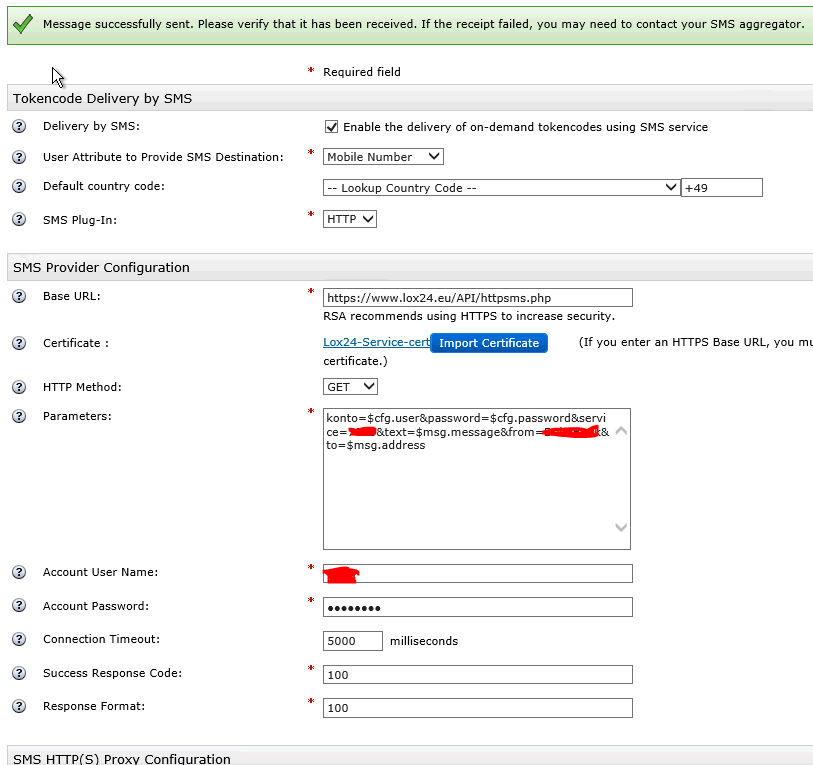
- The base URL is: ../../API/httpsms.php
- Certificates: You can download the certificates with your browser or also under this link. Link. Please note that the certificates are updated annually.
- Choose HTTP method as GET.
- For the parameters, enter the following: account=$cfg.user&password=$cfg.password&service=XXX&text=$msg.message&from=YYY&to=$msg.address
- The parameter for Service (XXX) You can find it in Dashboard Your web account, for Direct, Text2Speech, Economy or Pro
- The parameter From (YYY) You can specify your sender. This can be up to 11 characters long or a phone number with up to 15 digits. If the text contains special characters or spaces, the text must be separated by a line break. URL-Encoded be it.
- Account User To set the name, enter your LOX24 customer number. You can also use this number to log in to our website.
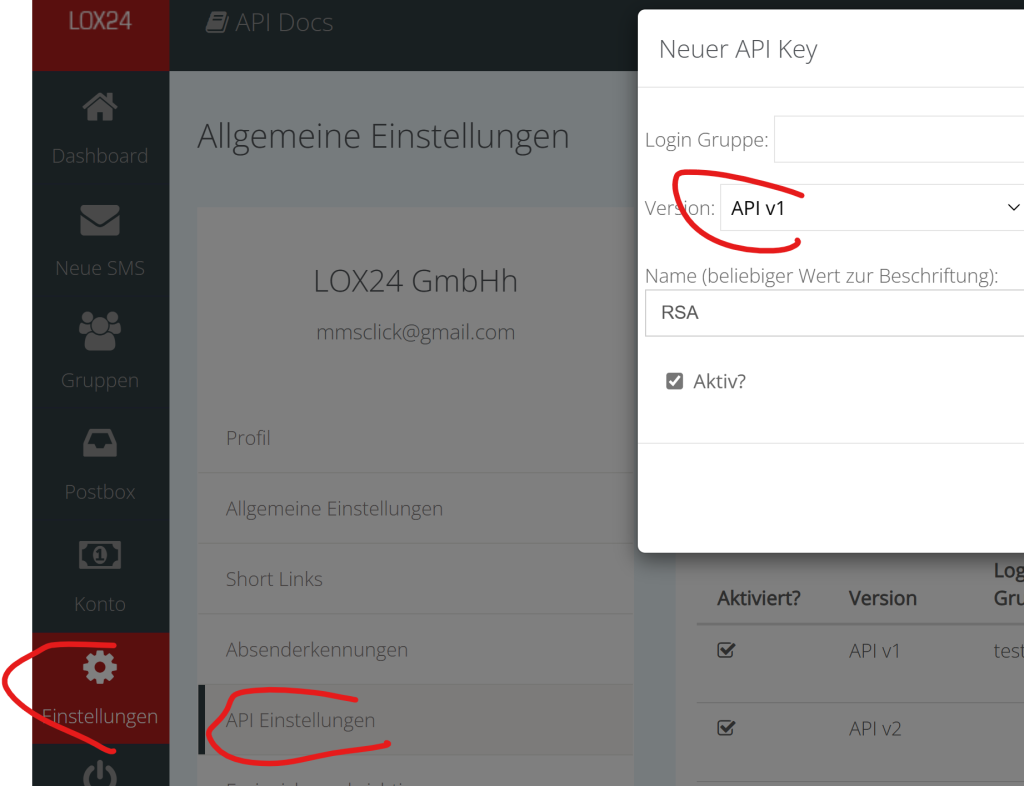
- Account Password Enter an API Key v1. You can create the API Key v1 in the web account under Settings and API Settings.
- Set the connection timeout to „5000“.
- Enter „100“ as the Success Response Code.
- You also enter „100“ in the Response Format field.

Advantages of sending RSA SMS with LOX24
The RSA SecurID Suite helps companies of all sizes reduce identity risks and ensure compliance without compromising user productivity. It grants users the right access and verifies their identity via SMS in a modern and user-friendly way. Furthermore, the RSA SecurID Suite provides unified visibility and control over the various aspects of identity within the company.
The LOX24 SMS API is a powerful and reliable solution for sending SMS messages. With the LOX24 SMS API, you can connect your RSA Authentication Manager to the LOX24 SMS Gateway and send SMS for verification worldwide. The LOX24 SMS API offers you the following advantages:
- You benefit from high availability, quality and speed of SMS messaging.
- You pay a reasonable price Pricing without fixed costs or hidden fees.
- How do they meet the requirements of German data protection law, since all the servers are located in Germany?,
- You receive real-time statistics and delivery reports for your SMS messages.
The LOX24 SMS API is therefore an ideal choice for anyone looking for an easy, secure, and cost-effective way to send SMS messages with RSA.