

You can send SMS via LOX24 using your GFI software, such as the famous FaxMaker. All you have to do is register with LOX24 and adjust the settings for SMS sending in your software.
Requirements
- You must be registered with an account at LOX24
- You need an SMTP server for sending emails
- You need access to the Internet
Settings
- In the GFI FaxMaker configuration, click on SMS on the right and then on „Properties“.
- Activate the checkbox „Enable SMS Gateway“
- Select „Generic SMS service provider template“ and enter the following information.
If you are using the GFI NetworkServerMonitor, you can find the settings as follows:
- Click on „Alerting Options“ on the right and select „Properties“
- Activate the checkbox „Enable SMS Gateway“
- Select „Generic SMS service provider template“ and enter the following information.
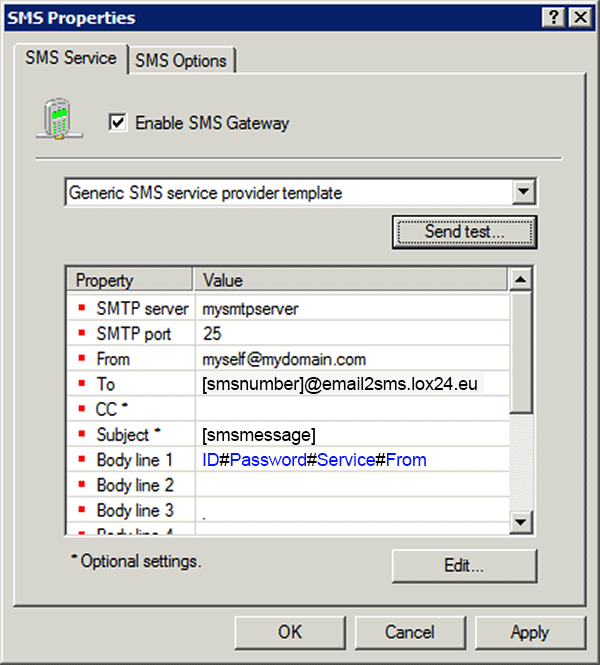
SMTP server: Please enter your own SMTP server. You can use the same SMTP server as for your own mail sending.
SMTP port: The port number that corresponds to the SMTP server
From: Your email address
To: [smsnumber]@email2sms.lox24.eu (Please do not change it and do not forget the brackets)
CC: (Optional) An email address to which you would like a copy of the email sent
Subject: [smsmessage]
Body line 1: ID#Password#Service#From (You will need to enter your own data here, as explained below. Please leave them # as the delimiters.)
Body line 2-x: leave empty
ID: LOX24 account number, e.g.: 1234
Password: As a password, you use an API Key v1. You can create this in your web account under Settings and API Settings.
Service: Service ID of the desired SMS type. You can find this in your account under www.lox24.eu in the "Tariffs" menu, e.g.: 12345
From: Sender identification (max. 15 digits or 11 characters of text) Number: +491701234567, 01701234567, 00491701234567, Text: Abcdefghijk
- Click on OK.
(Optional) To test the settings, click on „Send test…“ and enter a number for your test SMS and a text for the test. Then click Send and check if the SMS has arrived.